I love sparkles. And yes, I work at an AI company and I am a little obsessed with my job. In my admittedly biased opinion, designing icons is the best job in the world. I get to spend my days thinking about how small shapes communicate big ideas, and how much meaning can fit into very little space.
Sparkles are a lovely example. A single sparkle can feel delicate; a cluster can feel celebratory. With very little, they can make something ordinary feel a little more special. Their appeal is easy to understand, particularly for those of us whose work involves making complex technology feel approachable.
But lately, sparkles have been all over the place. Like if someone just decided to sparklify everything.
Writing tools sparkle. Search fields sparkle. Photo editors sparkle. Summaries, recommendations, and assistants sparkle. I wouldn't be surprised to find a sparkle on a sparkle.

That shared convention is useful. My concern is what happens when we treat it as a requirement, adding a sparkle to every AI-powered button whether or not it helps someone understand the interface. Recognizing that something involves AI is only part of the picture. People still need to understand what each feature does and how it differs from the one beside it.
A familiar symbol gives us something to build on. It also asks us to decide where that familiarity helps.
Sparkles had a life before AI
The sparkle didn’t begin on a screen. Long before it appeared beside a prompt field, shapes we would recognize today as sparkles were being cast in metal as part of early twentieth-century Monotype ornament collections. They appeared in different treatments: solid, outlined, and with inset. The visual possibilities we explore in icon libraries today already had counterparts in the printer’s type case.

That connection is so interesting. A shape that now announces a new technology also belongs to a much older world of ink, paper, and typographic ornament. That doesn’t establish a direct lineage between a particular metal ornament and an interface icon, but it gives the shape a history beyond its current associations.
Enter the ✨sparkle✨ emoji. Emojipedia traces it to Japanese mobile carriers in the late 1990s and discusses its relationship to visual conventions in manga and anime, where sparkles express beauty, excitement, happiness, and magical transformation. A 2008 Unicode proposal described it as “sparkling new.” Later, people began placing sparkles around words to add emphasis, affection, or sarcasm. A little visual flourish became a way of expressing tone.

Google’s account of the symbol’s history also points to its use in cleaning-product branding, where it suggested something clean, fresh, or improved. There is a satisfying logic to that relationship: the surface is so clean that it catches the light.
These examples show how adaptable the shape has been. It can ornament a page, suggest a polished surface, or add a knowing wink to a sentence. Its meaning comes from where we place it and what surrounds it.
Software found that flexibility useful too. Google describes using sparkles for AI-assisted features as early as 2016, followed by work to redesign and standardize the symbol in 2023. The association with AI grew from an existing vocabulary of enhancement, assistance, and apparent magic.
I understand the choice. A sparkle is friendlier than a brain, less literal than a robot, and easier to simplify than a tiny neural network. It gives an unfamiliar capability a familiar, approachable shape.
A shared symbol, several jobs
As sparkles have become more familiar in software, they have taken on several responsibilities. They can identify an AI feature, suggest an enhancement, or become part of a product’s visual identity.
Those roles can coexist, but each asks something different of the symbol. A category marker helps people recognize a capability across products. A brand element helps them recognize a particular product. An action icon helps them decide what to do next.
The design question is how those meanings work together in a particular context. A sparkle might be enough to identify the entrance to an assistant whose purpose is already clear. Inside a menu of individual tools, more specific visual distinctions may become useful.
That is where I find the conversation most interesting: how much should the sparkle communicate, and what should the rest of the interface contribute?
Four sparkles walk into a toolbar
The example that first brought this question into focus for me was a group of icons in Keynote, each carrying a sparkle. Seeing them together made me think about how a modifier behaves when it repeats across neighboring actions.

Having previously led the design of SF Symbols at Apple, I know how many considerations go into an icon. I don’t know the constraints behind this particular interface, and I encounter similar questions in my own work.
A sparkle can help a feature stand out. When several sit side by side, though, my eye starts to notice the repeated detail before the shapes that distinguish the actions. Each sparkle still says “AI,” but together they offer little help in deciding which tool to use.
If AI becomes an ordinary part of how software works, I wonder how often we will need to announce it this way. The sparkle may remain recognizable while telling us less. Giving it a little more space—and using it more selectively—could help preserve what makes it useful, and what makes it delightful.
Color adds another consideration. A shared color treatment can connect related features or make them easier to find. When color and sparkles appear together across a group, as in the Keynote example, I want to look carefully at the hierarchy. How much emphasis does the group need? Can I still scan the individual actions easily?
At small sizes, these choices also affect the drawing itself. A modifier needs space. Making room for it may mean reducing the base shape, simplifying a detail, or changing the balance of the icon. Sometimes that is a worthwhile exchange. Sometimes the defining shape needs more room.
Figma offers another example. In its 2024 AI beta, the Actions menu attached sparkles to commands for making designs, creating prototypes, renaming layers, replacing content, and editing text. The pattern continues in the menu I captured in September 2026.
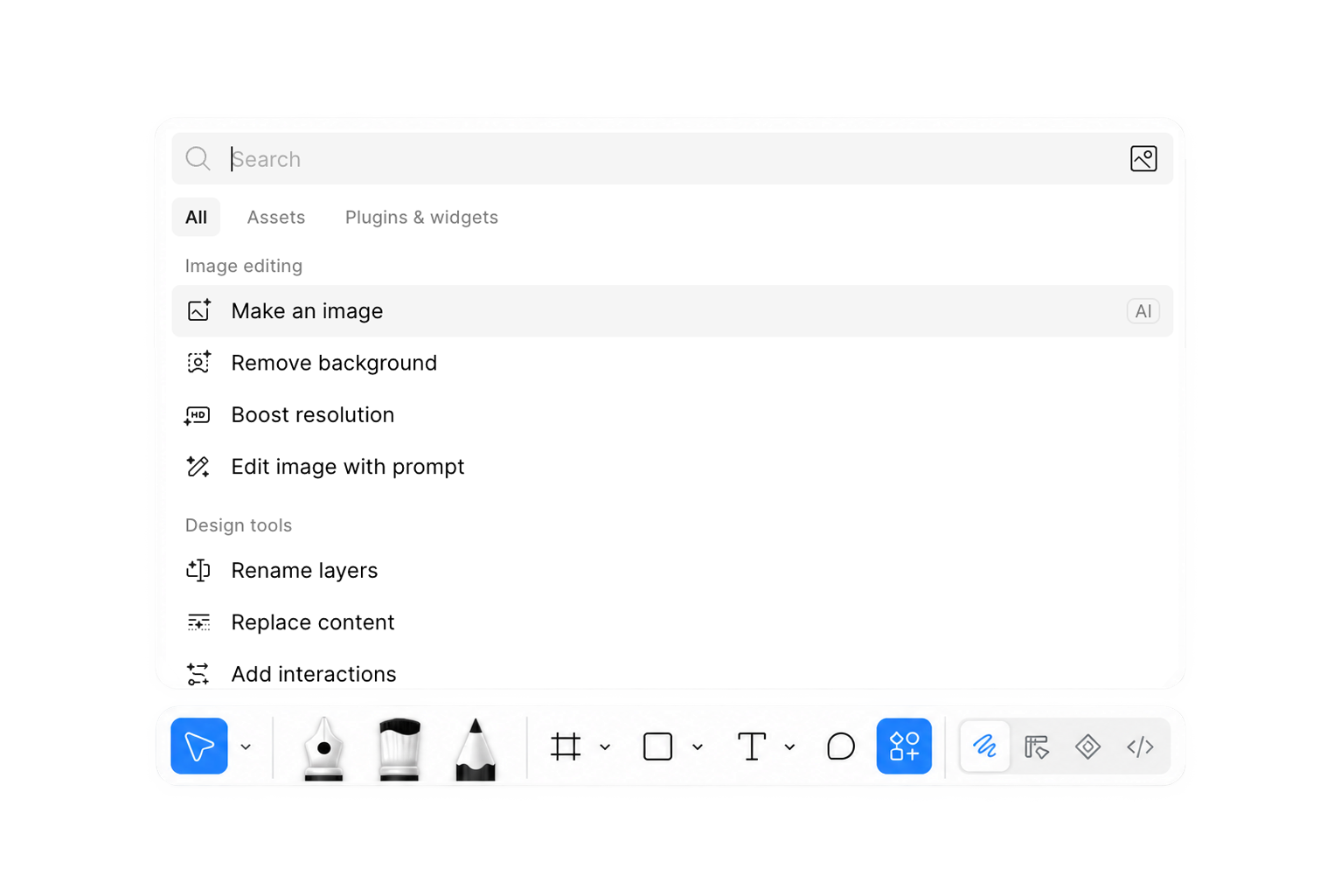
In that screenshot, several actions are visible across two sections. Under “Image editing,” there is “Make an image,” “Remove background,” “Boost resolution,” and “Edit image with prompt.” Under “Design tools,” there is “Rename layers,” “Replace content,” and “Add interactions.” Every one of those icons incorporates a sparkle. The highlighted “Make an image” row also displays an “AI” badge on the right.
That last detail makes the question especially interesting. On that row, the interface identifies AI through both the icon and an explicit label. Across the menu, the sparkle repeats beside actions with quite different purposes. How much does each repetition help us understand?
The base shapes already begin to distinguish the operations: an image, a selection boundary, an HD badge, a pencil. The sparkle contributes a shared association with AI, while the differences between the tools have to come from the remaining shapes and their labels.
There are understandable reasons for doing this. Each action may appear elsewhere on its own, where the modifier could provide useful context. Consistency across those placements matters. An explicit AI badge may also help people who have not learned the symbol. Within this menu, though, I find myself asking how much each layer contributes, and whether the individual metaphors would be easier to read with a little more room.
Labels are an essential part of an interface, and an icon does not have to explain every detail alone. Still, the shape and the words should support the same interpretation.
An icon family is a system of relationships. Each icon needs to work individually and alongside its neighbors. Looking at the whole group can reveal things that are difficult to see when reviewing one symbol at a time.
“Uses AI” is not a verb
Consider a writing menu offering proofreading, rewriting, summarizing, and tone adjustment. A shared sparkle can tell us that the tools are related. It cannot tell us which option will shorten a paragraph and which will change its tone.
Or imagine a sparkle-only button beside a photograph. Will it adjust the exposure, remove an object, or generate a new background? The surrounding interface may make the answer clear. Without that context, the symbol leaves several possibilities open.
“Summarize” tells me what I can do. “AI” tells me something about how it might be done. Both can matter, and the interface needs to make their relationship clear.
Google’s sparkle research describes a similar distinction: people recognized the association with AI, but the symbol did not always communicate the particular technology or action involved. The researchers also found that context, labels, and the base icon could help people interpret it.
There is nothing unusual about an icon needing context. Plenty of familiar symbols do. A magnifying glass beside a text field suggests search; the same shape on a map can suggest zoom. Its surroundings help us understand what will happen when we click it. What deserves attention is whether we are giving the sparkle a task it can reasonably perform. It can be a useful cue for a category of capabilities while still needing a label, a more specific base shape, or a clear place in the interface.
The sparkle you didn’t mean
The growing association with AI also affects icons that were intended to communicate something else.
In HP’s study of sparkle iconography, 64 U.S. participants were shown icons without surrounding interface context. Some inferred intelligence or automation from icons that were not intended to represent AI.
The team also compared two laptop icons intended to communicate “new laptop” and “AI-powered laptop,” using different sparkle treatments. Most participants saw no meaningful difference. Those who noticed a stylistic difference still did not identify the intended distinction between AI and non-AI.

That finding feels particularly relevant to the work of drawing icons. We can spend hours refining the difference between two sparkles, but a distinction that is visible to a designer may carry no particular meaning for someone using the product.
“New” and “AI-powered” are quite different ideas to entrust to a small adjustment in shape.
Because the icons were tested in isolation, the findings do not tell us everything about how they would perform in a complete interface. They do show how much interpretation can remain unresolved in the symbol itself.
As one association grows stronger, some older meanings may become harder to communicate. A sparkle intended to suggest freshness, polish, or delight might now imply AI. That gives us another reason to consider the whole context, including the expectations people bring from other products.
Beyond the promise of magic
Sparkles can make a capability feel inviting. Once someone uses it, the interface has more practical work to do.
When a tool changes my writing or edits an image, I want to understand what happened, what I can control, and whether I can undo it. A sparkle may help me find the feature. Clear labels, previews, feedback, and controls help me use it with confidence.
This is part of what makes designing for AI interesting to me. We are working out how to introduce capabilities and how to make them understandable in everyday use. The visual language has to support both.
Identifying where AI is involved can be valuable. So can explaining what information a feature uses or showing exactly what it changed. The right treatment depends on what someone needs to know at that moment.
Let a sparkle be a sparkle
I don’t have a straightforward solution, and I’m not advocating for removing sparkles altogether. This is a difficult design problem. We are asking one small symbol to work across different features, products, and levels of familiarity with AI. A treatment that helps in one context may feel redundant in another.
A shared convention is valuable. Once people begin to recognize it, changing or removing it also has consequences. But that makes careful use more important. We need to consider what the sparkle means in each instance, what someone might reasonably expect from it, and whether its presence helps them choose an action.
Does it identify AI? Suggest an improvement? Introduce something new? Those meanings can overlap, but they are not interchangeable. If we use the sparkle for every kind of specialness, we risk weakening the association that made it useful in the first place. People may notice it without learning much from it.
For me, the work begins with looking at the whole interface. Give the base shape enough room to communicate. Consider how an icon behaves both alone and beside its neighbors. Ask whether a group label could carry information that every item currently repeats. Test what people understand from the symbol, including what they expect to happen after clicking it.
These are small decisions, but small decisions are what iconography is made of. There may be no single rule that resolves them all. There can still be more consideration in how we make them.
And leave some room for sparkles to be delightful. They had a rich, expressive life before AI, and I would like them to have one beyond it. A little light, a little celebration, something made with care. There should still be places where a sparkle can simply make us smile. More than anything, I want us to be thoughtful about what we ask them to communicate, so that when we use one, it still has something to say.
